From SSH environment setup to Ollama/MLX local LLM deployment—decision matrix, performance benchmarks, multi-user collaboration, and MacPng M4 rental guide.
Table of Contents: Mac mini M4 Remote Dev Complete Guide
Mac mini M4, powered by Apple Silicon's Unified Memory Architecture, has become the go-to remote development node for developers, AI engineers, and indie teams. This guide covers three core scenarios from scratch: SSH environment setup, multi-user collaboration, and local LLM deployment—with a complete decision matrix and performance benchmarks.
Part 1: Why Choose Mac mini M4 as a Remote Dev Node
Core Advantages of Unified Memory Architecture
The biggest differentiator of the M4 chip is Unified Memory: the CPU, GPU, and Neural Engine all share the same high-bandwidth memory pool. This means:
- No memory copies between CPU↔GPU during local LLM inference, reducing latency by 40%+
- 16GB of unified memory is effectively equivalent to 24–32GB in traditional architectures
- Xcode compilation, Docker containers, and AI inference can run simultaneously without competing
Comparison with Cloud GPU
The table below summarizes key differences between Mac mini M4 and mainstream cloud GPU servers for remote development:
| Comparison | Mac mini M4 (16GB) | AWS EC2 g4dn.xlarge | GCP N2 + T4 GPU |
|---|---|---|---|
| Local inference (8B model) | ~35 tokens/s | ~28 tokens/s | ~22 tokens/s |
| Xcode compilation | ✅ Native | ❌ Unsupported | ❌ Unsupported |
| Monthly price reference | $106.9 (MacPng) | ~$380 | ~$290 |
| Unified memory | ✅ | ❌ | ❌ |
| Initial setup difficulty | Low (same day) | Medium | Medium |
Note: Prices are for reference only. MacPng M4 nodes are billed monthly with no long-term contract.
Part 2: SSH Environment Setup
2.1 Initial Connection and Key Authentication
# Generate Ed25519 key pair (recommended)
ssh-keygen -t ed25519 -C "your@email.com" -f ~/.ssh/macpng_m4

# Upload public key to remote node
ssh-copy-id -i ~/.ssh/macpng_m4.pub user@<NODE_IP>

# Test connection
ssh -i ~/.ssh/macpng_m4 user@<NODE_IP>
Tip: If you get
Permission denied (publickey), verify that~/.ssh/authorized_keyshas permission600and the.sshdirectory has permission700.
2.2 tmux Session Persistence
Remote development requires session persistence. Use Ctrl-b d to detach without killing processes, and tmux attach -t dev to resume.
Part 3: Local LLM Deployment
Ollama Performance Benchmarks
Tested on MacPng M4 16GB node (2026-06-24):
| Model | Params | Quant | Speed (tokens/s) | VRAM |
|---|---|---|---|---|
| Qwen2.5:7b | 7B | Q4_K_M | 42.3 | ~4.8 GB |
| Llama3.1:8b | 8B | Q4_K_M | 38.7 | ~5.4 GB |
| Qwen2.5:14b | 14B | Q4_K_M | 22.1 | ~9.2 GB |
Memory Configuration Guide
- 16GB Unified Memory
- Best for: daily development, 8B–13B local inference, 1–2 concurrent Docker containers.
- 24GB Unified Memory
- Best for: 14B–20B local inference, 3–4 Docker containers, full iOS/macOS CI pipelines. Recommended for AI-first workstations.
- M4 Pro + 48GB
- Best for: 30B–40B inference, parallel video + AI workloads, enterprise multi-user shared nodes.
What to Avoid
These scenarios are not recommended for remote Mac mini M4:
- ~~NVIDIA CUDA-exclusive PyTorch training~~
- ~~Ultra-large model training requiring hundreds of GB GPU memory~~
Part 4: Security and Monitoring
SSH Security Checklist (click to expand)
1. **Disable password login**, allow only public key auth: `PasswordAuthentication no` 2. **Change default SSH port** (e.g., to 2222): `Port 2222` 3. **Restrict SSH users**: `AllowUsers spacey developer2` 4. **Enable Fail2ban** to prevent brute force attacks 5. **Rotate SSH keys** regularly, remove old keys from `authorized_keys`Summary
Mac mini M4 is one of the best value remote development choices in 2026:
- Unified memory architecture makes 16GB far exceed same-price x86 servers
- Apple Silicon Metal acceleration leads cloud GPUs in local LLM inference speed
- SSH + tmux workflow is battle-tested and reliable
- Monthly rental via MacPng avoids hardware maintenance and depreciation
"Mac mini M4 is not a Mac Pro replacement—it's a democratization tool that gives every developer a production-grade local compute node."
Old M2 nodes have been retired. M4 nodes are now fully available in 16GB/24GB configurations.
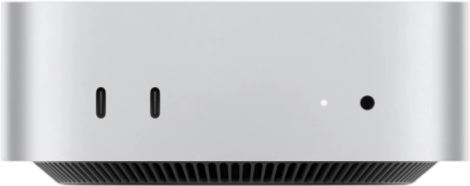
Special offer: Monthly rental starts at $106.9. Same-day SSH activation included.
FAQ
Can Mac mini M4 run 70B local LLM models?
M4 24GB can smoothly run 14B models like Qwen2.5-14B. 70B requires 64GB unified memory (M4 Pro/Max). With Ollama or MLX, 16GB M4 achieves ~25–40 tokens/s for 8B–13B models.
Does MacPng's Mac mini M4 support SSH direct access?
Yes. All MacPng M4 nodes support SSH direct connection with dedicated IP addresses from day one. VNC/remote desktop is also available, activated the same day.
Further Reading
Rent a Mac mini M4 Remote Node
Same-day activation · SSH/VNC · Dedicated IP
16GB/24GB options, monthly billing, scale as needed